A school that remembers: how I built Classroom Memory on cognee
There is a moment every teacher in a crowded classroom knows. You are standing in front of fifty kids, you just explained recursion for the third time, and you can feel that some of them get it and some of them are quietly drowning. But you cannot tell who. You have one brain and fifty of them, and by the time the exam tells you who was drowning, it is too late to do anything about it.
I grew up around classrooms like that. In India, a single teacher facing forty to sixty students is normal, not the exception. And the thing that always bothered me is that all the education technology we built over the last decade attacked the wrong half of the problem. We got very good at delivering content: video lectures, endless question banks, adaptive drills. What nobody built was memory. A system that actually remembers what each individual child knows, what they are forgetting, and what they are ready to learn next.
So for The Hangover AI hackathon, I decided to build that. I called it Classroom Memory, and this is the story of how it came together, and why the piece that made it work was cognee.
The Why: it is a memory problem, not a content problem
The Why: it is a memory problem, not a content problem
The reframe is the whole thing. Once you stop thinking “how do I deliver the right question” and start thinking “how do I remember this specific student,” the design falls out naturally.
A student is not a score. A student is a little knowledge graph: concepts they have mastered, concepts they are shaky on, concepts they have not touched, and the prerequisite links between all of them. Recursion sits on top of functions, which sits on top of variables. If you know that structure, and you know where each student actually is inside it, you can do something no gradebook can: you can tell a teacher exactly what to teach next, and why.
That is what I wanted the app to do. Not show more red numbers. Actually reason about the class.
Before I write about the architecture, here is what I ended up shipping:
- a student console with an adaptive quiz and a live prerequisite graph;
- one isolated Cognee Cloud dataset per student;
- student recall, so Alice can ask questions from her own memory;
- a progress report generated from that student’s memory;
- a teacher view that reads across the class;
- a graph-reasoned teaching plan, not just a heat map;
- one-click review assignments for students who are red or rusty;
- class roster setup and new-student enrollment;
- curriculum import, so the app is not hardcoded to Python;
- a verification script that checks the Cognee Cloud lifecycle end to end.
That list matters because the project only became interesting when it stopped being a nice-looking demo and started behaving like a small product a teacher could actually use.
The How: many small memories, not one big brain
Here is the architectural decision that shaped everything, and honestly the one I am proudest of.
The tempting way to build any memory app is to shove everything into one giant graph. One big brain. It looks impressive in a screenshot. But a single big graph does not actually need the cloud. It runs fine on a laptop.
A classroom is the opposite shape. It is many private memories, one per student, with a teacher who reads across all of them, plus a combined class view that no single student should be able to see. That is a multi-tenant problem. And that is the honest answer to “why does this need Cognee Cloud instead of local Cognee?” It is not convenience. It is that the architecture itself, private per-student memories plus cross-student teacher reads, cannot exist on a single-user, single-writer local instance.
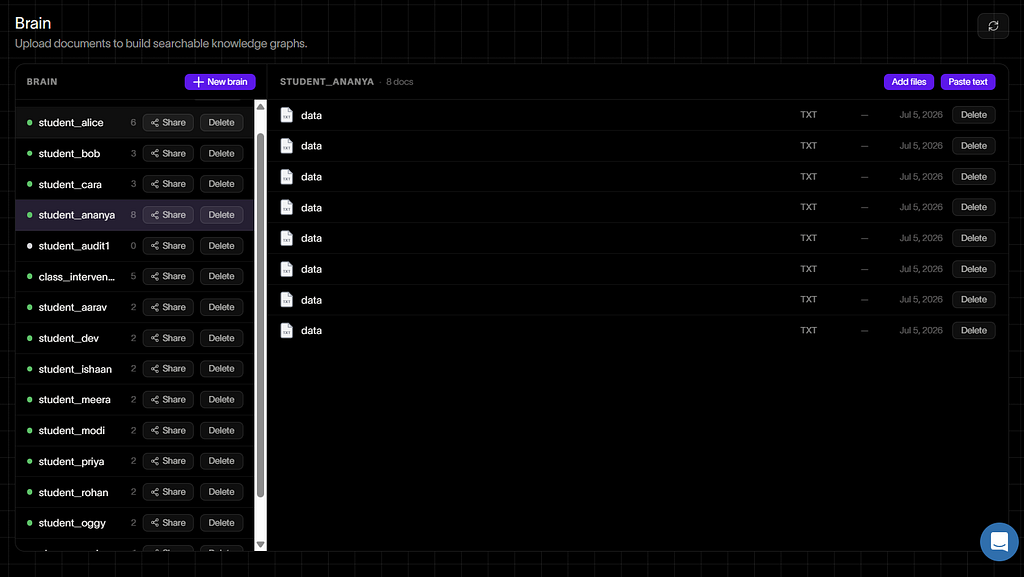
So the backend is a thin FastAPI layer over a provider pattern. There is a deterministic demo provider (so the whole thing runs offline with zero dependencies, which saved me during more than one flaky-wifi moment), and a real cloud provider that talks to Cognee. Each student is one Cognee Cloud dataset. Enrolling a student creates a new one. Resetting a student deletes one. The teacher’s questions run across all of them at once.
The connection itself is almost embarrassingly simple, which is a compliment:
await cognee.serve(url=CLOUD_URL, api_key=API_KEY)
# now remember/recall/forget all hit the hosted tenant
await cognee.remember(curriculum_doc, dataset_name=f"student_{name}")
answer = await cognee.recall("what should this student learn next?",
                             datasets=[f"student_{name}"])
# Cognee is async, but the FastAPI endpoints are sync. So every cognee call
# runs on a dedicated background event-loop thread and blocks for its result.
loop = asyncio.new_event_loop()
threading.Thread(target=loop.run_forever, daemon=True).start()

def _call(coro, timeout=60):
    return asyncio.run_coroutine_threadsafe(coro, loop).result(timeout)

_call(cognee.serve(url=CLOUD_URL, api_key=API_KEY))# connect once,reuse everywhere
The other half of the design is less flashy but just as important: I did not try to make Cognee Cloud pretend to be a gradebook. Exact mastery weights, timestamps, retired concepts, rosters, and assigned interventions live in a SQLite ledger. Cognee Cloud stores the long-term memory: curriculum context, student progress snapshots, session memories, mastery traces, class graph memory, and intervention traces.
That split made the app feel sane. The database answers “what is Alice’s exact score on variables right now?” Cognee answers “what does Alice’s memory know, and what can the teacher ask across the class?” One is precise state. The other is durable, queryable memory.
In the UI, that becomes four plain verbs:
- remember() seeds curriculum and writes learning traces;
- recall() powers the student ask box, report card, and teacher class questions;
- session memory records quiz attempts as the learning session unfolds;
- forget() resets a student's memory when the workflow needs a clean slate.
This was the point where the app’s architecture started matching the real world. Classrooms need both ledgers and memories. Scores alone are too small. Memory alone is too fuzzy. Together, they become useful.
The Secret Weapon: why Cognee, and why not a vector database
I want to be honest about this, because I went in skeptical. My first instinct on any “give the AI a memory” task is to reach for a vector database. Embed everything, do similarity search, done. I have shipped that pattern before.
The problem is that a vector database only knows that two things are similar. It does not know that one thing requires another. And my entire product lives or dies on that distinction. “Recursion requires functions” is not a similarity. It is a relationship, a directed edge, and if the system does not understand edges, it cannot reason about what to teach first.
Cognee is a memory layer that builds an actual knowledge graph out of what you give it. I feed it plain sentences, “learning recursion requires functions and conditionals,” and it extracts the concepts as entities and the prerequisite as a real edge in a graph. Then when I ask a student’s memory “what must I learn before decorators?”, it does not match keywords. It traverses the graph and answers “functions and closures,” because those are the nodes those edges point to.
# Each prerequisite is written as its own plain sentence, so Cognee's extractor
# turns concepts into entities and "requires" into real directed edges.
lines = []
for c in curriculum["concepts"]:
    line = f"The concept '{c['name']}' means: {c['summary']}"
    if c["requires"]:
        names = ", ".join(concepts[r]["name"] for r in c["requires"])
        line += f" Learning '{c['name']}' requires first understanding: {names}."
    lines.append(line)

# one remember() call seeds this student's whole prerequisite graph
await cognee.remember("\n".join(lines),
                      dataset_name=f"student_{name}",
                      node_set=["curriculum", "python"])
That single capability, graph traversal over extracted relationships, is why nothing else on my shortlist would have worked:
- A vector DB would have found “similar” text and missed the prerequisite structure entirely.
- Plain RAG would have retrieved chunks and let an LLM guess, which is exactly the confident-but-wrong behavior I was trying to avoid.
- Rolling my own graph in Postgres or Neo4j meant I would spend the whole hackathon writing extraction and traversal code instead of building the product.
cognee gave me the graph, the extraction, and the hosted multi-tenant storage in one package, with a lifecycle that maps cleanly onto what a classroom actually does: remember to teach it, recall to ask it, forget when a student transfers out. And crucially, it is multi-tenant in the cloud, which is the only reason the one-dataset-per-student design was even possible.
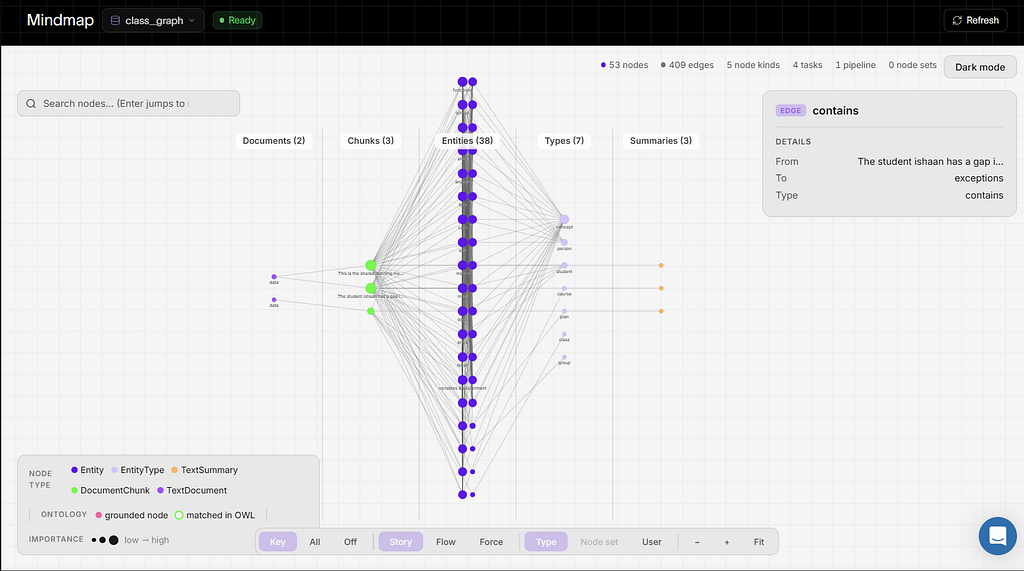
The part that genuinely surprised me was seeing the graph it built. I never told Cognee “make a node for Alice.” I wrote sentences about Alice, and it materialized her as an entity connected to every concept she had mastered, connected in turn to the concepts those unlock. The whole class, twelve students and twenty-two concepts, became one dense, navigable web that I could open and click through in Cognee’s own console.
# The whole class in ONE dataset: every student-concept pair is its own
# sentence, so the graph comes out dense (students <-> concepts <-> prerequisite
# concepts) instead of a sparse list.
lines = []
for sid, state in students.items():
    for cid, rec in state.items():
        name = concepts[cid]["name"]
        if band(rec["weight"]) == "green":
            lines.append(f"The student {sid} has mastered {name}.")
        elif band(rec["weight"]) == "red":
            lines.append(f"The student {sid} has a gap in {name}.")
        else:
            lines.append(f"The student {sid} is still learning {name}.")

await cognee.remember("\n".join(lines), dataset_name="class_graph",
                      node_set=["class-overview", "python"])
The Result: a system that decides, not just displays
Here is the moment the demo stops being “another quiz app.”
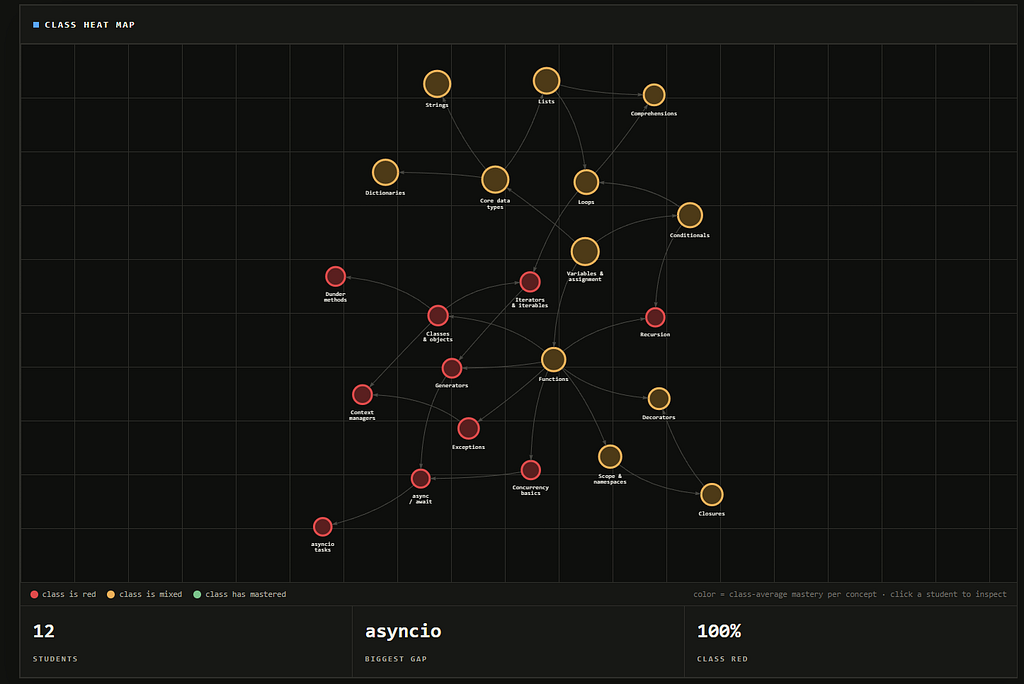
The heat map shows the class is one hundred percent red on the advanced topics, asyncio and recursion. A normal app would tell the teacher to go teach asyncio. My app looks at the same memory graph and refuses. It says: teach functions first.
Why? Because it scored every concept by how many students are stuck on it and ready for it (prerequisites already met) times how many downstream concepts it unlocks. The kids failing asyncio are not ready for asyncio. They are missing the foundations, and the prerequisite graph knows it. Functions has the ready students and unlocks thirteen downstream concepts, so it wins.
That is the difference between data and memory. Data shows you red dots. Memory, structured as a graph, tells the teacher what to do on Monday morning and defends the choice. You cannot do that without both the prerequisite structure and every student’s mastery living in one connected graph, which is exactly what Cognee gave me.
# Score every concept by: students stuck on it AND ready for it (prerequisites
# met), times how much it unlocks downstream. The order is pedagogy that falls
# out of the graph, not a hand-written rule.
for cid, c in concepts.items():
    ready = [sid for sid, state in students.items()
             if band(state[cid]["weight"]) == "red"          # stuck on it
             and all(state[r]["weight"] >= RED_MAX            # but ready for it
                     for r in c["requires"])]
    unlocks = downstream[cid]           # concepts that transitively need it
    score = len(ready) * (1 + unlocks)  # ready students x leverage
# asyncio has the most red students, but almost none are READY for it, so
# functions (ready students + 13 concepts unlocked) wins the week.
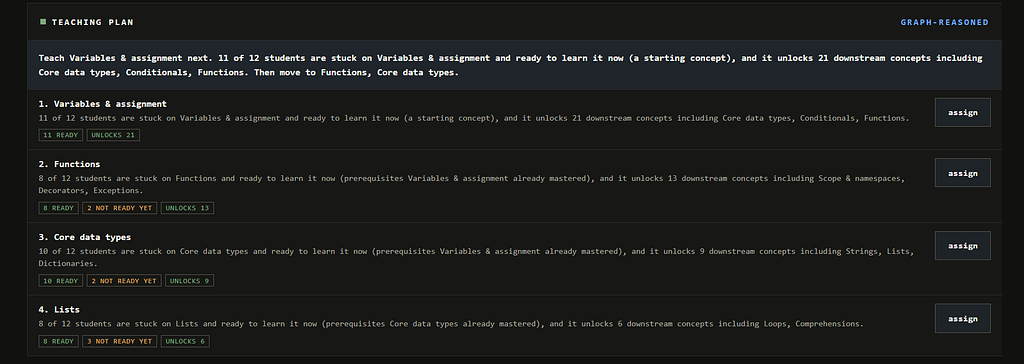
A few other things fell out of treating this as memory instead of storage. Each student has a learning timeline, and concepts they mastered months ago but never revisited show up as “rusty,” because real knowledge fades and the system schedules review instead of pretending a green checkmark is forever. And one button generates a parent-ready progress report, pulled live from the student’s own cloud memory, not from a template.
The part where it became a product
The first version was basically a good demo: Alice, Bob, Cara, a graph, a quiz, and some cloud calls. It looked promising, but I could feel the weakness immediately. A teacher cannot use a project that only works for three hardcoded students and one hardcoded Python course.
So I forced myself to add the boring features. They ended up being the features that made the project credible.
I added enrollment, so a teacher can create a new student and get a blank memory. I added class setup, so a whole roster can be pasted in at once. I moved the mastery state out of a JSON blob and into SQLite, because a classroom memory should survive a server restart. I added curriculum import, because if the only course is the one I typed by hand, the app is not a platform; it is a presentation.
The teacher intervention workflow was the final piece. A heat map is only useful if it leads to action. So the teacher can click “assign” on a gap like recursion, and the app creates a targeted review list for the students who are red or rusty. In cloud mode, that action also becomes a Cognee memory in class_interventions. The teacher's decision is no longer just a button click. It is part of the class memory.
# The teacher's action is not just a UI event: it is written back as memory,
# so "who did I assign review to, and why?" stays answerable later.
cognee.remember(
    f"Teacher assigned review for '{concept_name}' to: {names}.",
    dataset_name="class_interventions",
    node_set=["teacher-intervention", "python"])
That was the moment I started liking the project. Not because it had more screens, but because the screens began to connect:
- Student answers a quiz.
- Mastery changes.
- Memory gets updated.
- Teacher sees the class pattern.
- Teacher assigns review.
- The intervention becomes memory too.
It is a small loop, but it feels like a real product loop.
The receipts: proving it was actually cloud memory
One thing I did not want was a demo where the website says “cloud” and the backend is quietly doing everything locally. So I added proof in three places.
First, the UI exposes the memory lifecycle. The student page shows the active student’s dataset, curriculum seed state, session memory count, and mastery traces. The teacher page shows class recall and intervention output. The About page has an architecture diagram that shows the exact flow: browser to FastAPI, FastAPI to SQLite for exact state, and FastAPI to Cognee Cloud for memory.
Second, I wrote a verification script. It connects to the tenant, checks remember(), checks recall(), checks multi-dataset class recall, checks forget(), and runs the red-to-green quiz arc. I wanted a command that could fail if my claims were fake.
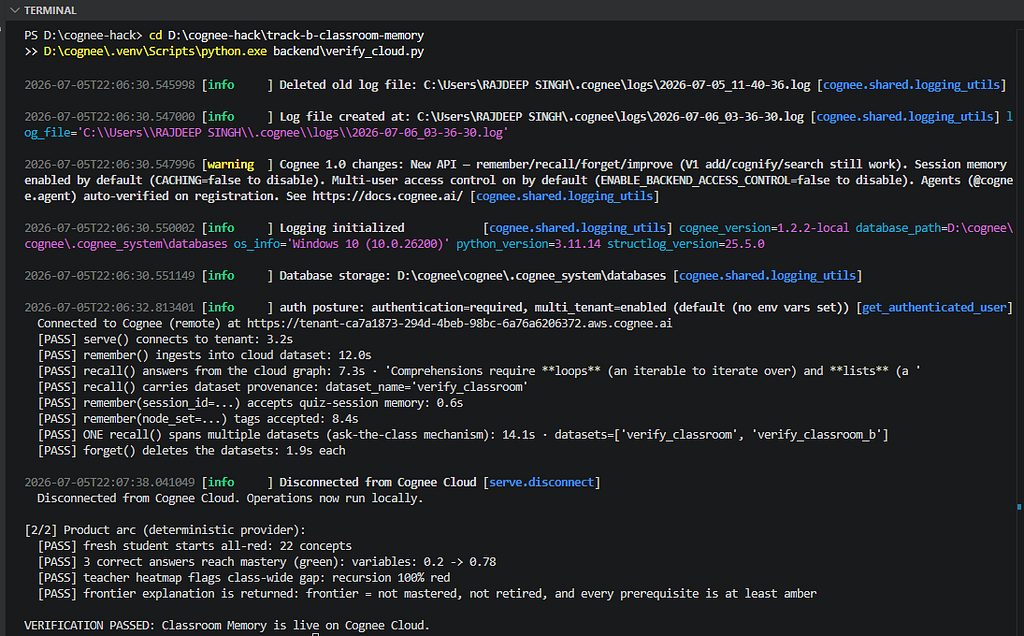
Third, I used the Cognee Cloud console itself as the receipt. Open student_alice and you see the private student memory. Open class_graph and you see the class as a dense graph. Open class_interventions and you see teacher actions written as memory. That is the most satisfying proof because it is outside my app. Cognee's own console can inspect what the project created.
The messy middle
The build was not smooth, and I think that is worth saying because hackathon posts often pretend every idea arrives fully formed.
At one point the UI looked impressive but was barely usable. The graph was too small on the teacher page. The student page had three dense columns competing for space. The teacher’s class recall answer came back as a giant wall of text. The first architecture diagram did not explain the data flow clearly enough. Those were not algorithm bugs, but they mattered. A memory product has to be understandable the second a teacher opens it.
So I kept rearranging until the product had a simple rhythm: student mastery first, then graph, then report; teacher ask first, then teaching plan, then intervention, then roster and heat map. I learned that for this kind of project, UX is not polish after the fact. UX is how the memory becomes legible.
There were also small engineering decisions that saved the project later. The provider boundary meant I could run demo mode offline and cloud mode against the tenant without changing the frontend. The SQLite ledger meant I could reset, enroll, and assign review without worrying about fragile file state. The curriculum JSON format meant I could talk about the app as a classroom memory engine, not a Python quiz toy.
None of that is as glamorous as a knowledge graph screenshot. But those are the parts that made the graph useful.
Where this could go next
The obvious next step is not “add more quizzes.” The next step is to let the memory travel.
If Alice changes devices, her memory should follow her. If a parent asks for a summary, the report should come from the same memory the teacher sees. If a school changes the curriculum, the graph should keep the relationships and rebuild the frontier. If another agent wants to tutor Alice, it should not start from zero. It should ask Cognee what Alice already knows.
That is the bigger idea I walked away with. We talk about AI tutors as if the model is the product. I think the memory is the product. The tutor, the dashboard, the report card, the teacher assistant, even the parent update are just different views over the same durable memory.
Cognee Cloud made that idea feel practical because the memory is not trapped inside my frontend. It is hosted, inspectable, and queryable. The app becomes one client of the memory, not the place where the memory dies.
What I took away from it
I went in thinking the impressive thing about a memory layer would be how big one graph could get. I came out believing the opposite. The impressive thing is that memory can be private, plural, and queried across boundaries. One student’s memory is theirs. The teacher’s view is an aggregate the student never sees. That shape, many private memories with controlled cross-reads, is what real classrooms, real organizations, and real products actually need, and it is what a multi-tenant memory layer like Cognee is uniquely built for.
A single big brain is a great screenshot. A school full of private memories that a teacher can reason across is a product.
If you want to poke at it, the code is on GitHub at github.com/RajdeepKushwaha5/ClassroomMemory. It runs offline in demo mode with no account, and against a live Cognee Cloud tenant with one. Built solo, and verified end to end against a real tenant before I dared to write any of this down.