From Simple Requests to Scalable Systems: Understanding Messaging Queues, Kafka, and RabbitMQ
1). The Problem with Direct Communication (Why We Need Queues)
2️). What Is a Messaging Queue? (Producer–Consumer Model)
3️). Why Kafka Exists (High Throughput & Streaming)
4️). Kafka Architecture (Topics, Partitions, Brokers, Groups)
5). How Kafka Handles Scale & Fault Tolerance
6). RabbitMQ Fundamentals (Exchanges & Queues)
7).️ Message Routing in RabbitMQ
8️). Reliability (ACK, Retry, DLQ)
9️). Kafka vs RabbitMQ (When to Use What)
10). Real-World System Design Example
1) The Hidden Problem Behind “Simple” Requests
When we use an application, everything looks simple.
We click a button.
- “Book Ride”
- “Upload Video”
- “Place Order”
- “Send Payment”
And within seconds, we get a response.Behind this simplicity, however, a complex system is working continuously.Every small action triggers multiple processes in the backend.
Let’s understand this with a real-world example.
A Ride-Booking App in Action
Imagine you are building an app like Ola or Uber.
When a user books a ride, the system must:
- Receive the request
- Find a nearby driver
- Track GPS location
- Store data in the database
- Calculate fare
- Send notifications
- Log the activity
All these steps happen for one user request.
Now multiply this by:
- Thousands of users
- Thousands of drivers
- Continuous GPS updates
Suddenly, the system is handling millions of operations every minute.
This is where problems begin.
How Traditional Systems Work
In early system designs, services talked to each other directly.
This is called synchronous communication.
Example:
Client → Server → Database → Response
The client sends a request.
The server processes it.
The database is updated.
Only then is the response sent back.
The client must wait until everything finishes.
This is similar to a phone call.
You call someone.
You wait.
They answer.
Only then can you speak.
The entire process is blocked until completion.
Why Direct Communication Fails at Scale
At small scale, this approach works.
At large scale, it becomes dangerous.
Let’s see why.
1. Blocking and Delays
If any part of the system becomes slow, everything slows down.
For example:
- Database is overloaded
- Payment service is down
- Notification service crashes
Result:
The user keeps waiting.
The request gets delayed.
Sometimes it fails completely.
One slow service can affect the whole system.
2. Tight Coupling Between Services
In direct communication, services depend on each other.
If Service B is down,
Service A cannot work.
This is called tight coupling.
It makes the system fragile.
One failure spreads everywhere.
3. Poor Scalability
Suppose your server handles:
- 10,000 requests per second
One day, traffic becomes:
- 100,000 requests per second
What happens?
The server cannot handle it.
Requests start failing.
Users leave.
There is no buffer to absorb the load.
4. Database Bottlenecks
Databases are much slower than memory.
If every request writes directly to the database:
- Database becomes overloaded
- Latency increases
- System slows down
No database can handle unlimited throughput.
Eventually, it becomes the weakest point.
A Practical Example: Video Upload Platform
Consider a video-sharing platform.
When a user uploads a video, the system must:
- Store the file
- Convert format
- Generate thumbnail
- Extract metadata
- Send notification
If all this happens synchronously:
The user waits for minutes.
This leads to poor user experience.
Rethinking System Design
Engineers started asking an important question:
Do we really need to do everything immediately?
The answer was no.
Many tasks are not urgent.
For example:
- Sending emails
- Processing videos
- Logging data
- Analytics
- Notifications
These can be done later.
The user does not need to wait for them.
The Shift to Asynchronous Processing
Instead of saying:
“Do everything now”
Modern systems say:
“Do important work now. Do the rest later.”
This is called asynchronous processing.
It means:
- Do not block
- Do not wait
- Process in background
This makes systems faster and more reliable.
The Buffer Concept
To support asynchronous processing, systems need a middle layer.
Something that can:
- Store requests temporarily
- Handle traffic spikes
- Work even when services are down
- Deliver messages later
This middle layer is called a queue.
A Simple Analogy: The Post Office
Sending a letter works like this:
You drop the letter in a post box.
You go home.
The post office delivers it later.
You do not wait for delivery.
In software:
- You are the producer
- Post box is the queue
- Receiver is the consumer
This model allows systems to work independently.
Key Takeaway
Traditional direct communication fails because it:
- Blocks requests
- Creates tight coupling
- Scales poorly
- Overloads databases
To solve this, modern systems introduce:
- Asynchronous processing
- Buffers
- Message queues
- Event-driven design
This is the foundation of modern distributed systems.
And this naturally leads us to the next topic:
Messaging Queues and the Producer–Consumer Model.
2). Messaging Queues — The Backbone of Modern Distributed Systems
After understanding why direct communication fails at scale, we arrive at an important question:
How do modern systems handle millions of requests without breaking?
The answer is simple:
They don’t process everything immediately.
They organize work first.
This organization happens through messaging queues.
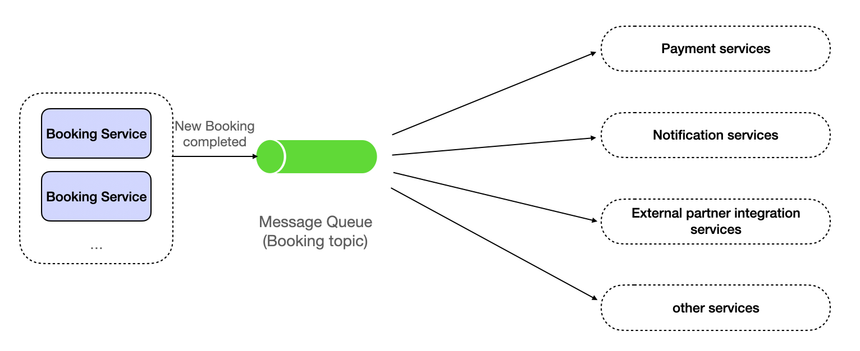
What Is a Messaging Queue?
A messaging queue is a temporary storage system for tasks.
Instead of sending a request directly to another service, the system:
- Creates a message
- Puts it in a queue
- Moves on immediately
The receiving service processes it later.
In simple terms:
“Store now. Process later.”
Basic Flow
Producer → Queue → Consumer
- Producer: Creates the message
- Queue: Stores the message
- Consumer: Processes the message
Each part works independently.
No one waits for the other.
Why Queues Make Systems Stronger
Messaging queues solve many problems that traditional systems face.
Let’s see how.
1. Removing Waiting Time
Without queues:
The client waits until every task finishes.
With queues:
The client gets an instant response.
Example:
When you place an order on Amazon:
You immediately see “Order Confirmed”.
But in reality:
- Invoice generation
- Warehouse processing
- Shipping updates
All happen later through queues.
Your experience stays fast.
2. Handling Traffic Spikes
Traffic is never constant.
Sometimes:
- Sale starts
- Video goes viral
- Exam results are announced
Suddenly, millions of users arrive.
Without queues:
Servers crash.
With queues:
Requests are stored safely.
Consumers process them gradually.
This is called load buffering.
The system stays alive even under pressure.
3. Service Independence
In queue-based systems, services don’t talk directly.
They communicate through messages.
So if one service fails:
- Messages stay in the queue
- No data is lost
- Processing resumes later
This is called loose coupling.
Services are connected,
but not dependent.
4. Reliable Message Delivery
Most modern queues guarantee:
- Messages are not lost
- Messages are delivered at least once
- Failed tasks can be retried
If a consumer crashes:
The message returns to the queue.
Another consumer handles it.
Nothing disappears silently.
Producer–Consumer Model Explained
The heart of messaging systems is the producer–consumer model.
Let’s understand it properly.
Producer
A producer creates work.
Examples:
- User uploads a file
- Payment is made
- Order is placed
- Log is generated
It does only one thing:
Send a message.
It does not care who processes it.
Consumer
A consumer performs work.
Examples:
- Resize image
- Send email
- Update database
- Generate report
It listens to the queue.
Whenever a message arrives, it processes it.
Multiple Consumers
One powerful advantage is scaling.
You can add more consumers anytime.
Producer → Queue → Consumer 1
                   Consumer 2
                   Consumer 3
More consumers = more speed.
No change needed in producers.
Real-Life Example: Online Exam System
Imagine an online exam platform.
After submission:
System must:
- Save answers
- Calculate score
- Generate certificate
- Update leaderboard
- Send email
With queues:
- Student submits exam
- System puts tasks in queue
- Student gets confirmation
- Processing happens later
Even if 50,000 students submit together,
the system survives.
Types of Messages
Not all messages are the same.
Common types include:
1. Task Messages
Used for background jobs.
Example:
- “Convert this video”
- “Resize this image”
- “Generate invoice”
2. Event Messages
Used to notify changes.
Example:
- “User registered”
- “Payment completed”
- “Order shipped”
Other services react to these events.
This enables event-driven architecture.
3. Log Messages
Used for monitoring and debugging.
Example:
- Error reports
- Usage statistics
- Performance data
These are sent to analytics systems.
Message Acknowledgement
To ensure reliability, consumers send acknowledgements.
Flow:
- Consumer receives message
- Processes it
- Sends ACK (acknowledgement)
If ACK is not received:
Queue resends the message.
This prevents data loss.
When Not to Use Queues
Queues are powerful, but not always needed.
Avoid them when:
- You need instant response
- Task is very small
- System is simple
Example:
Login authentication should be direct.
Delaying it makes no sense.
Good engineers know when to use queues
and when not to.
Key Takeaway
Messaging queues provide:
- Faster user experience
- Better scalability
- Fault tolerance
- Service independence
- Reliable processing
They turn fragile systems into stable platforms.
This is why almost every large company uses them.
In the next section, we’ll explore:
Popular Messaging Systems like Kafka, RabbitMQ, and SQS — and when to use each.
3). Popular Messaging Systems — Kafka, RabbitMQ, and AWS SQS
Now that we understand how messaging queues work, the next big question is:
Which tool should we use in real projects?
In practice, most companies rely on three major systems:
- Apache Kafka
- RabbitMQ
- AWS SQS
Each one solves a different type of problem.
Choosing the wrong one can slow your system.
Choosing the right one can make it scale effortlessly.
Let’s understand them one by one.
Apache Kafka — Built for Massive Data Streams
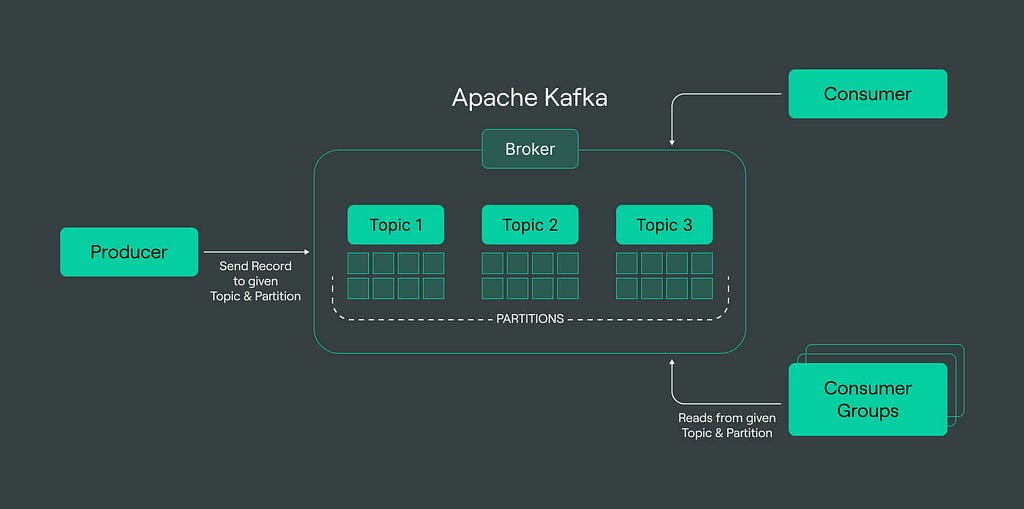
Apache Kafka is not just a queue.
It is a distributed event streaming platform.
Kafka is designed for:
- Very high speed
- Huge volumes of data
- Real-time analytics
- Long-term message storage
How Kafka Works
In Kafka:
- Messages are stored in topics
- Topics are divided into partitions
- Data is stored on disk
- Messages are kept for days or weeks
Unlike normal queues, Kafka does not delete messages immediately.
Consumers can:
- Read old data
- Reprocess messages
- Replay events
This makes Kafka very powerful.
Where Kafka Is Used
Kafka is used when data is continuous and massive.
Examples:
- Netflix streaming logs
- Uber trip tracking
- Stock market feeds
- IoT sensor data
- Website analytics
If your system generates millions of events per second,
Kafka is usually the answer.
Pros of Kafka
- Extremely fast
- Horizontally scalable
- Data persistence
- Supports replay
- Great for analytics
Cons of Kafka
- Complex setup
- Hard to manage
- Needs expertise
- Overkill for small apps
When to Use Kafka
Use Kafka when:
- You need real-time pipelines
- You handle big data
- You want event history
- You need streaming analytics
Kafka is for large-scale systems.
RabbitMQ — Reliable Messaging for Applications
RabbitMQ is a traditional message broker.
It focuses on:
- Reliable delivery
- Flexible routing
- Application-level messaging
RabbitMQ is simpler than Kafka and easier to start with.
How RabbitMQ Works
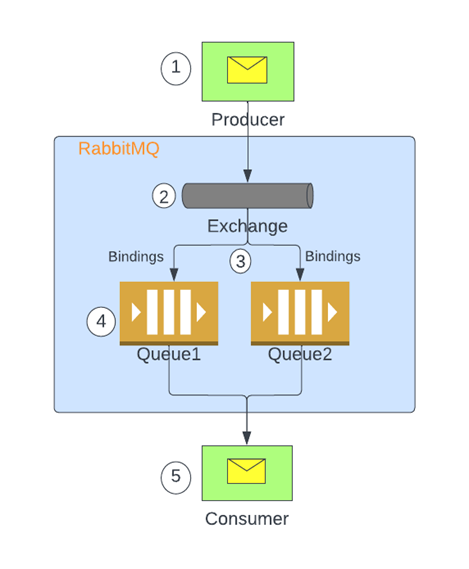
RabbitMQ uses an important concept called Exchange.
Flow:
Producer → Exchange → Queue → Consumer
The exchange decides:
Which queue should receive the message.
This allows smart routing.
Types of Exchanges
RabbitMQ supports:
- Direct (one-to-one)
- Fanout (broadcast)
- Topic (pattern-based)
- Headers (metadata-based)
This makes RabbitMQ very flexible.
Where RabbitMQ Is Used
RabbitMQ is common in:
- Web applications
- Microservices
- Payment systems
- Chat systems
- Task processing
It works well for medium-scale systems.
Pros of RabbitMQ
- Easy to use
- Good documentation
- Flexible routing
- Reliable delivery
- Lightweight
Cons of RabbitMQ
- Not good for huge streams
- Limited replay support
- Slower than Kafka at scale
When to Use RabbitMQ
Use RabbitMQ when:
- You need task queues
- You want reliable jobs
- You use microservices
- Your system is medium-sized
RabbitMQ is for business application.
AWS SQS — Fully Managed Cloud Queue
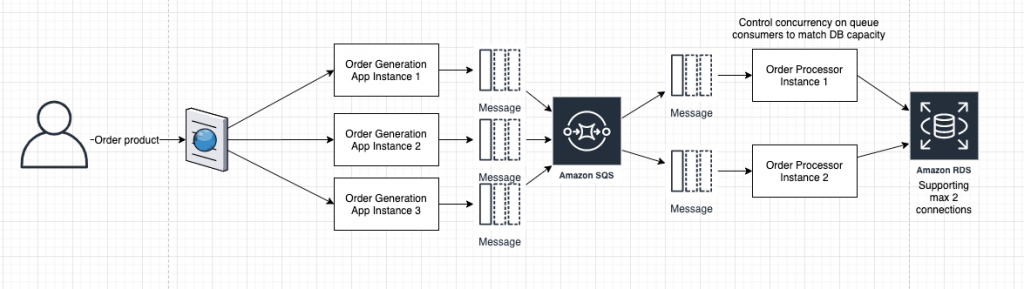
Amazon SQS (Simple Queue Service) is a cloud-based queue.
It is managed by AWS.
This means:
- No server setup
- No maintenance
- No scaling worries
You just use it.
AWS handles everything.
How SQS Works
SQS is simple.
Flow:
Producer → SQS → Consumer
AWS stores messages.
Your app reads them.
That’s it.
Types of SQS Queues
SQS has two types:
1. Standard Queue
- Very fast
- Unlimited throughput
- Messages may repeat
- Order not guaranteed
Used for high-scale systems.
2. FIFO Queue
- Strict order
- No duplicates
- Slower
- Limited throughput
Used when order matters.
Where SQS Is Used
SQS is common in:
- Serverless apps
- AWS microservices
- Background jobs
- Cloud-native systems
If you use AWS, SQS fits naturally.
Pros of SQS
- No infrastructure
- Auto scaling
- Highly reliable
- Cheap
- Secure
Cons of SQS
- Works only in AWS
- Less control
- Limited customization
When to Use SQS
Use SQS when:
- You are on AWS
- You want zero maintenance
- You build serverless apps
- You want fast setup
SQS is for cloud-first systems.
How Engineers Choose in Practice
Good engineers don’t choose tools randomly.
They ask:
- How much data?
- How fast?
- Cloud or on-prem?
- Budget?
- Team skill?
Example:
- Startup on AWS → SQS
- Fintech app → RabbitMQ
- Analytics company → Kafka
Tool follows need. Not trend.
Key Takeaway
Kafka, RabbitMQ, and SQS exist because systems have different needs.
- Kafka → Data streams at scale
- RabbitMQ → Reliable app messaging
- SQS → Cloud-native queues
There is no “best” queue.
There is only the right fit.